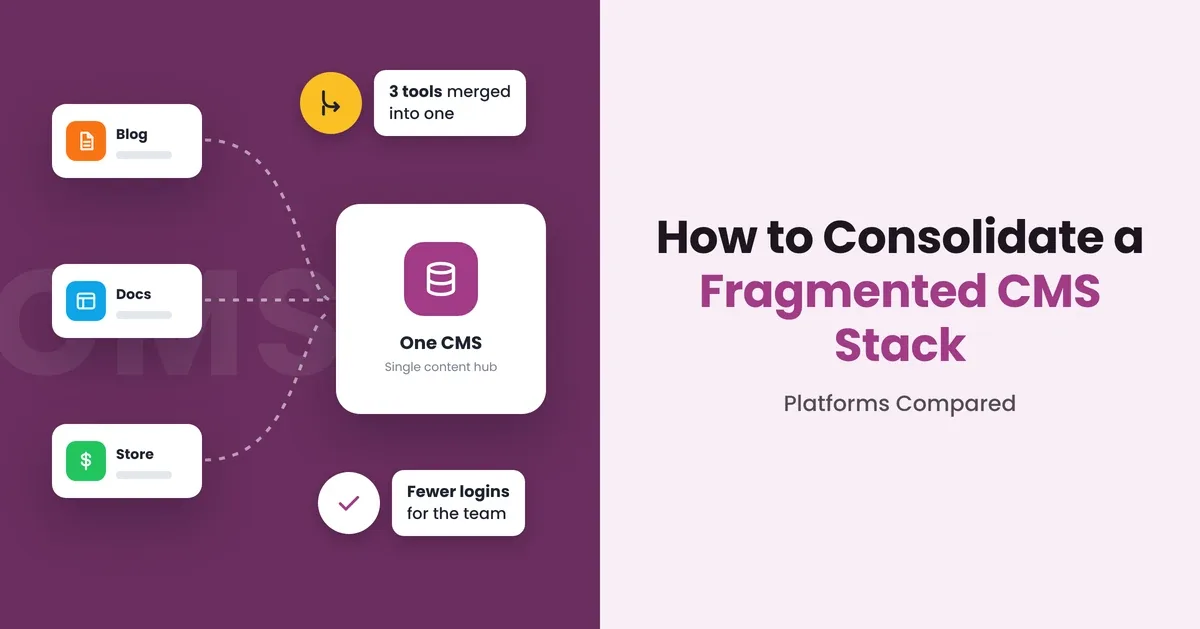
This is what a fragmented CMS stack usually looks like. And the answer is not always to move everything into one new platform. Sure, some general content is indeed shareable. But, some needs to stay specific to a brand or market, and some data is better left in the systems that already manage it. The challenge is figuring out what to bring together, what to leave alone, and which headless CMS can handle it best. Let’s look at how to approach that and compare the platforms worth considering!
Why Do CMS Stacks Become Fragmented?
If a business has already started with a certain system, why not continue using it for every new brand or market? Well, in fact, not every new brand needs the same things as the previous one. There could be a much larger product catalog in a new market. The local team may want more freedom to design website pages or keep/edit their market-specific content. There could be some legal limitations for using specific platforms in a certain country too.
On top of that, data like product descriptions, prices, or availability is usually managed in separate PIM, ERP, or commerce systems. Local accountants may use different systems for their work as well. Different analytics tools could be tied to the local platforms. With every new market, more platforms, third-party tools and data sources just keep adding up.
What Problems Does CMS Fragmentation Create?
Getting Content to Every Channel Takes Extra Work
Your website, mobile app, other channels need information from several systems at once. If each channel has to connect to those sources separately, developers end up building similar integrations again and again.
Shared Content Gets Trapped in Separate Systems
Your central team may already have approved product descriptions, brandbooks or campaign materials. But local teams cannot access this content through their own tools. Thus, they have to request it, copy it or even recreate parts of it.
Every New Connection Adds Maintenance Work
Every time one of your systems changes, you need to check whether the connections still work as intended. There is always a risk that a change in one place affects several of your digital channels.
When Does CMS Consolidation Make Sense?
You don't necessarely need to consolidate several CMSs if your business is small. The question is whether your current setup will still work well with the growth of your business. Here are the situations where connecting your systems will make a real difference:
When the Same Content Goes to Different Channels
Each location needs to receive their own product descriptions and images for their websites. You can manage it centrally and deliver the relevant parts through an API.
When Your Teams Need Different Systems but Share Some Data
Your marketing team works in a CMS, your product team uses a PIM, while your sales team relies on a commerce platform. Evidently, these tools serve different purposes, so replacing them all would also make little sense. But the website still needs information from all three! So, a shared content layer will bring the required data together.
When Every New Channel Requires Another Integration Project
Your existing websites already get content and data from several systems. Now you want to launch an app, a partner portal, or another storefront. A common API layer gives new channels access to the data they need without rebuilding connections.
What to Look for in a CMS Consolidation Platform
Flexible Content Modeling
Your brands, products, markets rarely use content in exactly the same way. Check whether the CMS gives you enough freedom to model different content types without creating another structure for every use case.
Connection with External Systems
This is the strongest benefit when migration is not the best answer. A platform with proper content federation correctly works with data that remains in external systems. You are not forced to move everything into a single CMS.
API Capabilities
Your website is only one destination for content. Apps, commerce platforms, portals, other digital products may need the same information. Look at the available APIs and how easily different channels consume the content.
Scalability and Localization
Another brand, market, website may join your stack later. The platform should still make sense when the number of content types increases.
Governance
Consolidation puts more content and more teams into the same environment. Thus, check how to set up permissions, separate environments and publishing controls.
CMS Platforms Compared
Hygraph
Hygraph’s main strength is Content Federation. You can connect external REST and GraphQL APIs and query their data alongside Hygraph content through one GraphQL API. Product descriptions can live in Hygraph, while prices and stock come from your commerce platform, meaning there is no need to copy external data into the CMS!
Storyblok
Storyblok centers on its Visual Editor. Editors can click on a page preview to edit the corresponding content block. They can also add, remove, and rearrange predefined blocks. For multilingual websites, you can manage translations and publish each language version on its own schedule.
Contentstack
Contentstack gives editors more control over page structure through Modular Blocks. Developers define the available blocks, while editors can add, remove, and rearrange them. Global Fields let teams reuse the same field groups with many content types.
Sanity
Sanity lets developers customize both content models and the editing interface. They can build their own tools and components in Sanity Studio using React. Its GROQ query language can filter, combine, and reshape content before sending it to the frontend. GraphQL is also available through a generated API.
How Hygraph Can Help Consolidate Content
Hygraph allows companies to leave information where it already belongs without moving every piece of content into one CMS. With its Content Federation feature, it connects external REST and GraphQL sources with content managed in the platform. The connected data can then be queried through the same GraphQL API as your Hygraph content. This changes the migration question from “How do we move everything into one CMS?” to “Which content actually needs to move?”
Hygraph becomes a unified content layer. It helps reduce the number of connections your digital channels need to manage individually. Instead of building separate paths to several content sources, they can now work through one GraphQL API. This makes the architecture much easier to manage without forcing a full migration.
Common Challenges When Consolidating a CMS Stack
Mismatched Content Models
Map the existing fields before migration and define a common model for shared content. A well-planned content architecture helps standardize reusable content across brands while keeping brand- and market-specific fields where they are needed.
Legacy Integrations
Existing websites may depend on custom APIs, search tools, forms or analytics integrations. Map these connections before switching platforms. Test which ones can stay, which need changes and which can be fully removed.
Disrupted Team Workflows
Teams usually rely on different approval stages, publishing schedules and access rules. Configure the essential workflows in the new CMS. Let central and local teams test real tasks before launch.
Risky Full Migration
Start with one brand, website or content type. Test integrations, permissions, localization and publishing before migrating the rest.
Conclusion
A connected setup can become a clearer place for all your teams to manage content. With a headless CMS, updates do not have to pass through as many manual steps. New websites and digital channels also have a clearer path to the content they need. What's even more important, you get a better view of your content architecture. So, your business will be ready to scale further!